

GPT Image 2 becomes much more useful when you stop treating it like a generic “make me an image” tool and start treating it like a layout-aware creative workflow. That matters even more for Chinese-language posters, Taobao-style product cards, and branded detail pages where the prompt needs to describe not only the subject, but also the hierarchy of the page.
This article focuses on one high-intent search use case: people who want GPT Image 2 or ChatGPT Image 2 to generate Chinese posters, product images, and commercial detail-page compositions. Instead of keyword stuffing, the goal is to document a repeatable prompt structure that real users can test.
Why Chinese poster prompts are harder than single-subject prompts
When users search for a Chinese AI image generator, they often do not want a standalone portrait or a random scenic illustration. They want a page that feels finished. That usually means:
- a clear subject such as a model, a drink can, a robot, or a skincare bottle
- a background style that supports the subject instead of fighting with it
- reserved zones for headline text, subheads, pricing, or selling points
- a composition that resembles an ad, not just a mood image
In other words, the prompt has to communicate design hierarchy. That is the difference between a beautiful image and a usable visual asset.
The four-part prompt framework
For Chinese posters and product-detail compositions, the most reliable framework is to write prompts in four parts:
- Subject: What is the hero object or person?
- Scene: What environment or visual context supports the subject?
- Layout request: Where should title areas, price areas, feature blocks, or visual callouts appear?
- Style request: What should the final image feel like: e-commerce, premium ad, fashion poster, anime concept, cinematic frame, or glossy studio product shot?
This sounds simple, but most weak prompts fail because they only do step one and maybe step four. They describe the object and the style, but forget the composition.
Prompt example: beverage poster
"一张现代饮料广告海报,主视觉是一罐柚子气泡饮,柑橘色渐变背景,画面左上预留品牌标题区域,右下有水果和水珠细节,整体像真实商业海报,少量可读中文占位文字,明亮高级感"
Why this prompt works:
- the subject is obvious: a yuzu soda can
- the scene is clear: citrus gradient background with fruit details
- the layout is specified: top-left title area, bottom-right support details
- the style is commercial and premium, not vague
The result is much more likely to feel like a finished ad instead of an isolated product cutout.
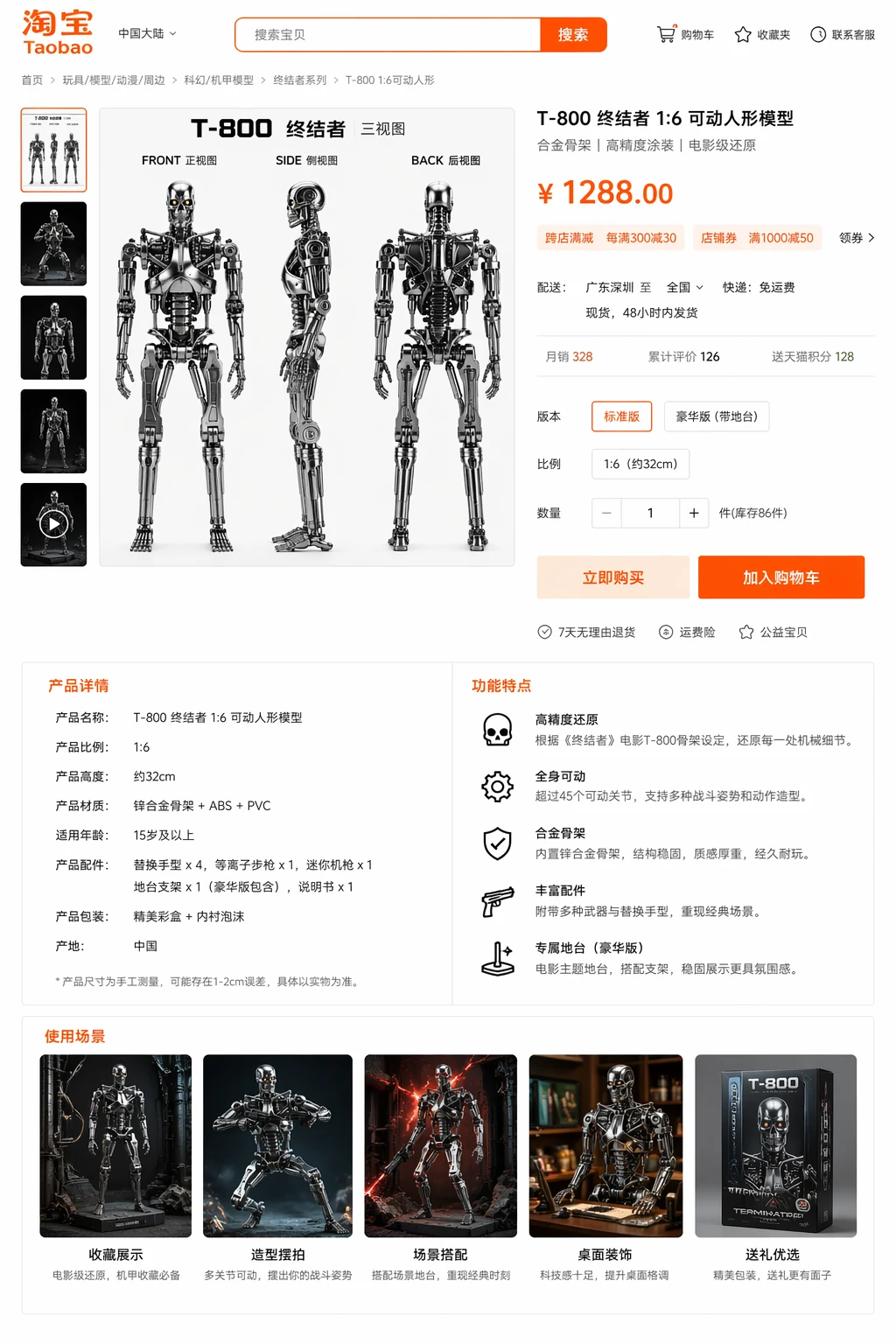
Prompt example: Taobao-style product detail hero
"淘宝商品详情页头图,一个机器人手办正面、侧面、背面三视图排布在主画面中,右侧有价格、卖点、规格参数区域,整体像完整电商详情页,白底,清晰排版,信息分区明确"
This is useful for users searching queries that overlap with Taobao product detail page, product-card prompts, and e-commerce image generation. Notice that the prompt is not trying to force the model to write long product copy. It asks for clear information zones. That is far safer and more reproducible.
How to improve readable text inside the image
Readable in-image text is still difficult for every model, including GPT Image 2. The practical approach is not to ask for long copy blocks. Instead:
- ask for short headline areas or few readable label blocks
- quote short text if it absolutely matters
- keep body-copy expectations outside the image when possible
- use the image for hierarchy and mood, then overlay exact text in design software later
This is one place where a lot of AI image tutorials become unrealistic. They promise full brochure-level copy inside the image, which leads to disappointment. A stronger editorial article should say that clearly.
Commercial prompt checklist
| Prompt Element | Weak Version | Better Version |
|---|---|---|
| Subject | "a drink" | "a silver yuzu soda can with condensation" |
| Scene | "nice background" | "bright citrus background with lemons and soft tabletop reflection" |
| Layout | none | "poster composition with a top-left title area and bottom-right fruit details" |
| Style | "beautiful" | "premium commercial photography, clean ad finish, polished magazine lighting" |
Where GPT Image 2 is genuinely useful
For Chinese-language product and poster prompts, GPT Image 2 is most useful when you need:
- strong prompt-following for multi-part instructions
- poster or detail-page composition, not just isolated imagery
- visual hierarchy that feels usable in marketing
- a fast way to iterate multiple commercial directions before you choose one
How we recommend testing prompt quality
Do not test one prompt once and assume that is the answer. A practical workflow is:
- write one baseline commercial prompt
- create a second version with clearer layout wording
- create a third version with a stronger style request
- compare which result is most reusable in a real poster or product page
That is much closer to how real creative teams work. They do not expect a perfect result from the first attempt. They compare creative directions.
How to turn one successful prompt into a reusable commercial template
Once you get one strong result, do not treat it as a one-off success. Save the prompt and break it into reusable parts. For example, keep one subject block, one scene block, one layout block, and one style block. Then swap only one of those blocks at a time. That lets you create a family of related assets instead of rewriting the prompt from scratch every time.
A practical template might look like this:
- Subject block: hero product or main character
- Scene block: citrus set, beauty counter, fashion poster wall, or plain e-commerce white
- Layout block: top-left headline, right-side selling points, bottom feature strip
- Style block: premium ad, clean catalog, warm lifestyle, anime-inspired concept art
This is the part that makes prompt work operational instead of purely creative. Teams that do this well build a small library of reusable structures, which is more valuable than collecting random “cool” prompts with no context.
What to review with marketers, founders, or product owners
Design teams often judge AI outputs by visual taste alone, but commercial images are usually reviewed by non-design stakeholders. That means a prompt workflow also needs to support business review. When you show a generated poster or product-detail concept internally, ask three simple questions:
- Does the hero subject read clearly in the first three seconds?
- If we add text later, is the hierarchy still clean?
- Does the image feel on-brand for the category we are in?
Those questions sound obvious, but they are a better filter than “do we like it?” A strong AI image workflow should make feedback more concrete, not less. If the answer to those three questions is mostly yes, the prompt has probably done its job.
Final takeaway
If you want better output from GPT Image 2 or ChatGPT Image 2 for posters and product images, focus less on fancy adjectives and more on composition. Subject, scene, layout, and style are the four elements that make commercial prompts useful. If you want to test these ideas directly, open the generator and start with one product-ad prompt plus one Taobao-detail prompt. That will tell you more than ten generic “best prompt” lists.
