

GPT Image 2 is most impressive when it is used for a job that normally costs real time and real money. Commercial product photography is a good example. A team might need a hero image for a landing page, a marketplace thumbnail, a social ad, a feature comparison tile, and a product-detail visual. Traditional production can absolutely deliver that, but it usually requires at least one of three things: budget, time, or a very flexible in-house designer. AI image generation becomes valuable when it reduces the number of expensive early-stage decisions.
This guide focuses on a practical question with real business value: how to use GPT Image 2 for commercial product photography without producing generic, unusable output. The goal is not to pretend AI replaces every studio shoot. The goal is to help you create concept images, ad directions, and structured layouts that are good enough to test internally, pitch to stakeholders, or hand off for final polishing.
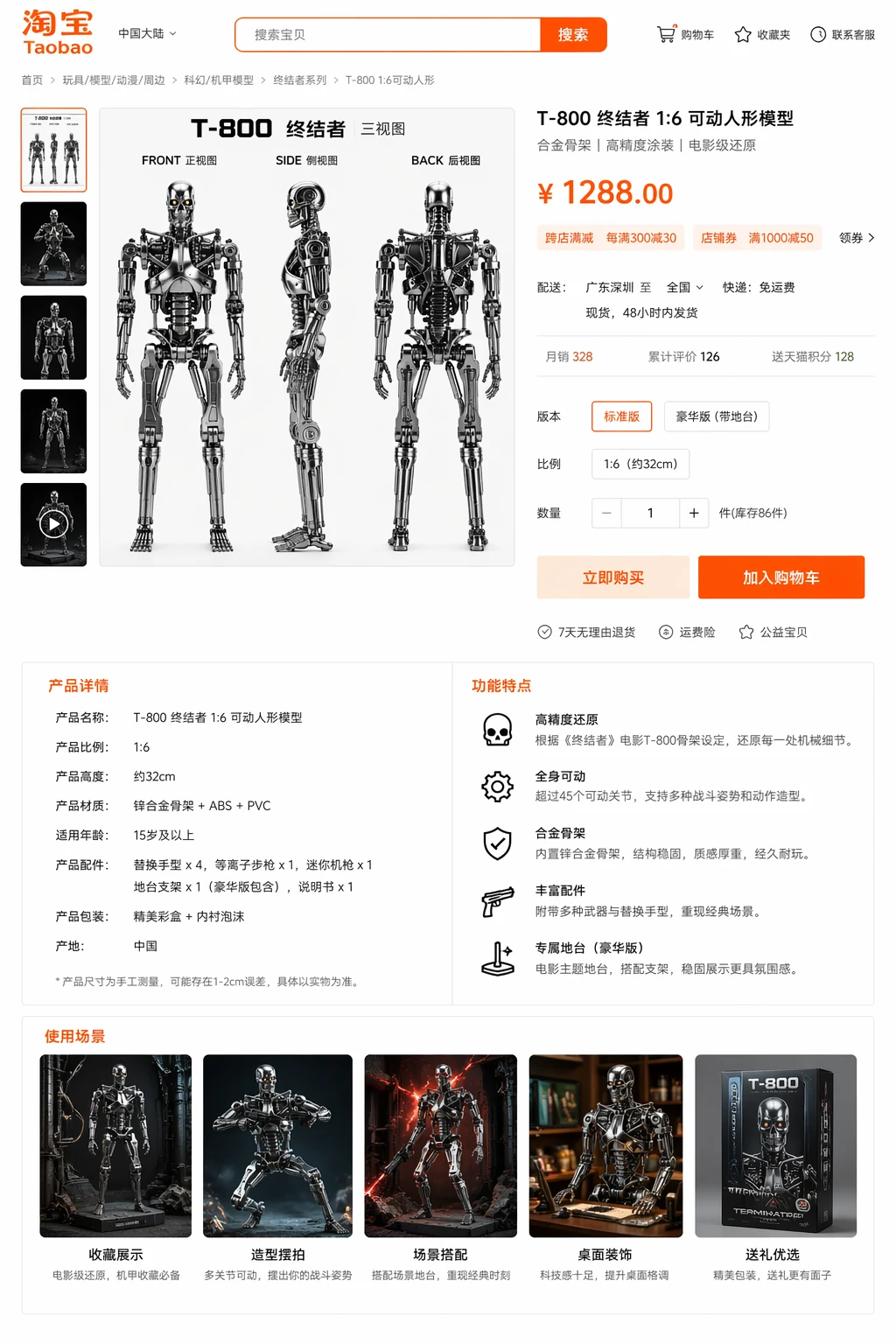
What commercial product photography really needs
Most failed AI product prompts are too vague. They ask for “a beautiful product shot” and expect something campaign-ready to appear. Real commercial photography has more moving parts than that. A usable product image usually needs at least:
- a clear hero subject and angle
- a background that supports the product instead of stealing attention
- lighting direction that matches the brand tone
- space for text, price, or feature callouts when the image is meant for a landing page or marketplace
- a finish that looks intentional rather than overly decorative
That means your prompt has to describe not only the product itself, but also the commercial purpose of the image. This is the part many tutorials skip. They write prompts as if the only question is style. In real workflows, placement matters just as much as style. A social ad, a product card, and a marketplace detail page all have different composition needs.
The five-part prompt structure that works
If you are using GPT Image 2 or a similar image workflow for product visuals, the safest structure is a five-part brief:
- Product definition: name the item, material, color, and defining visual traits.
- Viewpoint: specify whether you want a front hero, angled shot, close-up detail, three-view sheet, or lifestyle placement.
- Commercial context: say whether it is for a hero banner, e-commerce product card, poster, catalog, or detail page.
- Lighting and mood: describe clean studio light, luxury rim light, warm lifestyle light, or high-contrast editorial treatment.
- Layout needs: reserve zones for headlines, features, or pricing if the final frame must function like a marketing asset.
When all five parts are present, the output tends to be more reusable. When only one or two are present, the image may still be attractive, but it becomes harder to plug into a real campaign.
A baseline prompt you can start from
"A premium commercial product photograph of a matte silver smart speaker, front three-quarter angle, clean ivory studio background, soft top lighting with subtle reflective shadow on the surface, composition suitable for a landing-page hero with open space on the left for headline text, polished advertising finish, highly realistic materials."
Why is this better than a generic prompt? Because it names the product, the angle, the background, the lighting, the intended use, and the finish. That makes it much easier for the model to respond with a frame that feels like a piece of marketing instead of a random object floating in space.
How to adapt the same product for different channels
One of the strongest use cases for GPT Image 2 is not “make one perfect image.” It is “help me explore channel-specific directions quickly.” Here is a simple adaptation matrix:
| Channel | What the Prompt Should Emphasize | What to Avoid |
|---|---|---|
| Landing-page hero | Negative space, clear focal point, premium lighting | Cluttered props and tiny details that reduce readability |
| Marketplace thumbnail | Front-facing clarity, background simplicity, strong silhouette | Complex scenery that hides the product shape |
| Product detail page | Three-view structure, feature callout zones, information hierarchy | Asking for too much readable paragraph text in-image |
| Social ad | Stronger atmosphere, color accents, dramatic framing | Lifeless catalog compositions that feel generic in a feed |
What GPT Image 2 is actually good at here
The main strength is iteration speed with structured prompts. In product workflows, that matters because most teams do not need the first image to be final. They need it to answer questions like:
- Should this campaign feel premium or playful?
- Should the product sit in a minimal studio world or a richer lifestyle scene?
- Do we want three-view technical clarity or emotional hero framing?
- Can we create a better internal brief before we pay for full production?
That is where the tool is most useful. It reduces uncertainty. It gives you concrete directions to compare. It helps a designer, marketer, or founder stop arguing abstractly and start reacting to something visible.
What it is still risky to ask for
There are still limits, and saying that clearly is part of a more trustworthy, E-E-A-T-friendly guide. You should be cautious when you ask for:
- dense product-spec paragraphs inside the image
- perfect logo fidelity when the logo design is not already established
- medical, regulated, or legally sensitive packaging claims
- tiny product labels that have to be exact
A better workflow is to use the image for concept, composition, and atmosphere, then add exact labels and compliance copy in your normal design tools afterward. AI is strongest in the exploratory stage, not always in the microscopic text stage.
A realistic review checklist before you approve a generated product visual
- Product truthfulness: does the shape, finish, and material feel plausible for the item?
- Channel fit: would this image actually work in the placement you have in mind?
- Hierarchy: if there needs to be text or a price later, is there space for it?
- Brand fit: does the lighting and mood feel aligned with the category?
- Revision potential: if it is not final, is it at least a useful direction?
This checklist is important because teams often over-evaluate polish and under-evaluate usefulness. A visually stunning image that cannot hold a headline or communicate the product shape is less useful than a cleaner, slightly simpler composition that is easy to turn into a real ad.
How to build an efficient internal workflow
The most effective workflow usually looks like this:
- Start in the GPT Image 2 workspace with one product prompt and two composition variants.
- Generate a small batch focused on structure rather than decoration.
- Shortlist one image for premium direction, one for marketplace clarity, and one for social storytelling.
- Review those three with a marketer or product owner, not just with a designer.
- Only after that, push one direction into polished production or into a more detailed iteration round.
This creates a cleaner handoff. It also keeps AI in the part of the process where it helps most instead of forcing it to do every final-production task perfectly.
When to use the gallery, pricing, and blog guides together
If you are still testing whether the workflow is right for your team, use the gallery to inspect the quality level, the pricing page to estimate cost, and related benchmark articles in the blog to compare prompt structure and evaluation criteria. These pages are useful together because they answer different questions: output quality, cost, and method.
Final takeaway
GPT Image 2 is not most useful when it tries to replace a perfect final studio shoot. It is most useful when it helps you arrive at a stronger commercial direction faster. If you use it for layout-aware product concepts, structured campaign exploration, and realistic review loops, it can save a meaningful amount of time in commercial product photography. Start with one hero-banner brief and one product-detail brief in the generator, and compare which prompt structure gives you an image that is actually reusable.
